
AWS SECURITY · PRIORITIES & EVIDENCE

Your cloud is complex.Your decisions can be clear.

StackArc connects AWS risks, context and evidence to help you decide what to fix — and explain why.

V1.0.0 prelaunch · Coming soon

Our approach
01Read-only AWS access
02No installed agents
03Remediation under your control
04Built with Canadian teams in mind

INSIDE THE STACKARC CONSOLE

A closer look. A clear starting point.

From navigation to next steps: explore a few details of the real interface, then go deeper at your own pace.
Real captures · Interface excerptsV1.0.0
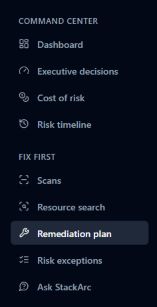
Real excerpt of the StackArc menu: Command Center with Dashboard, Executive decisions, Cost of risk and Risk timeline; then scans, resource search and remediation plan.
Navigation organized around your decisions
01Find your way quicklyNavigation that follows your team’s work.

Summary views provide a starting point. Scanning, resource search and remediation areas then help you investigate a specific question.

This excerpt shows part of the menu, without displaying every screen or any environment data.

02Prepare the fixesPriorities to review in your context.

The plan brings together fixes, severity, estimated effort and remediation channels. Your team reviews recommendations and retains control of changes.

Real heading of the Prioritised fix plan, ordered by severity and estimated effort.
Excerpt of the remediation-plan heading; account resources and recommendations are outside the crop.
03Prepare a reviewA starting point for the right conversations.

The executive report brings together information for discussion. The console provides guidance for printing or saving a PDF through your browser.

Real console guidance: Export this report, using the browser’s Print or Save as PDF function.
Excerpt of the report export guidance; no results or client documents are displayed.

Cropped console excerpts. No account identifiers or scan results are shown. Captures are non-interactive; the interface may evolve before public access opens.

Explore a decision example tooA fictional case to explain how to read priorities, evidence and remediation guidance.
StackArc / Decision view
Interactive illustration · Fictional data
EXAMPLE ENVIRONMENTAWS / S3
Priority for review

Public access to investigate

A storage configuration allows public access. Its purpose and the sensitivity of its data need to be verified.

Resourceexample-storage

Context behind the decision

Exposure
Public access detected
Business use
To be confirmed by your team
Next step
Verify the need for access

A simplified illustration of the product in preparation, not a customer account screenshot. Access to the service is not yet open.

FOR TEAMS THAT NEED TO DECIDE

One foundation. Different conversations.

Cloud & security teams

Turn findings into work priorities, with the associated resources and context.

Operational priorities
Explore the details : Cloud & security teams
  • Find the affected resources and the evidence behind a priority.
  • Prepare the remediation discussion, including information that still needs confirmation.

Leadership & risk owners

Use a concise view to discuss risks and the actions to prepare.

Explainable decisions
Explore the details : Leadership & risk owners
  • Share a summary of risks and priorities with the relevant stakeholders.
  • Separate observed evidence from assumptions so decisions can be explained without hiding uncertainty.

Teams preparing for audit

Bring together technical evidence for reviews, with coverage limits made clear.

Structured evidence
Explore the details : Teams preparing for audit
  • Organize findings and evidence by framework to prepare a review.
  • Identify controls that need additional organizational evidence: an AWS configuration cannot establish everything.

THE STACKARC WORKFLOW

From your environment to your next decision.

  1. 01

    Authorize read access

    A dedicated AWS role and temporary credentials define access to your configurations.

    Explore the details : Authorize read access
    • Review the AWS role permissions before authorizing the connection.
    • StackArc then obtains temporary credentials to read authorized configurations, without asking you to share a permanent key.
  2. 02

    Connect the findings

    The analysis brings together signals, resources and available evidence to prepare priorities.

    Explore the details : Connect the findings
    • Findings connect a resource, a rule and the available technical evidence.
    • Exposure and context help organize the review. Missing information and collection limitations remain explicit.
  3. 03

    Choose what comes next

    Your team reviews the results, shares useful evidence and stays in control of remediation.

    Explore the details : Choose what comes next
    • Review decision views, prepare supporting evidence and examine the recommendations.
    • After your team makes changes, scan comparisons help track how findings evolve.

TRUST STARTS WITH ACCESS

Your environment. Your control.

Limited access and explainable analysis, so you understand what StackArc does — and what stays in your hands.

Your AWS environmentRead only · Temporary session
StackArc analysisFindings, context and evidence
Your teamRemediation decisions & execution
01

No resident agents

Collection uses AWS APIs. No software to install on your workloads.

Explore the details : No resident agents
  • Configuration analysis uses authorized AWS services. There is no agent to install on your servers or containers.
02

Temporary access

A dedicated role provides temporary sessions. No permanent customer AWS credentials are requested.

Explore the details : Temporary access
  • The connection uses AWS AssumeRole and temporary STS sessions. The role and its permissions remain under your control.
03

Deterministic decisions

Findings come from versioned rules. AI can help explain them; it does not decide the result.

Explore the details : Deterministic decisions
  • Rules provide the basis for decisions and their traceability. AI assistance can help summarize and explain results; it does not replace rule-based evaluation.
04

No automatic remediation

Proposals remain subject to review. StackArc does not modify your environment during analysis.

Explore the details : No automatic remediation
  • Remediation proposals are subject to your review. Your team remains responsible for approving, scheduling and executing changes.

A CLEAR SCOPE FOR THE FIRST RELEASE

AWS first. Canada in mind.

A first release designed for cloud, security and risk teams in small and midsize organizations, particularly in Québec and Canada.

AWS postureLoi 25 / PIPEDA readinessCanadian context

BEFORE YOU GO FURTHER

The essential answers.

Is the service open yet?

Not yet. This site presents StackArc v1.0.0 in prelaunch. Trials, demos, registration and payments are disabled. Public availability will be announced here.

Who is the first release designed for?

Teams managing AWS environments that need to prioritize risk, prepare posture reviews and explain their decisions. V1 focuses on AWS, with attention to the Canadian context.

Does StackArc modify my environment?

No. Analysis uses read-only AWS access with no installed agent. Your team remains responsible for reviewing and executing proposed fixes.

Do the results constitute certification?

No. Technical findings and evidence support your reviews. They do not, by themselves, cover every organizational, contractual or legal obligation.

Do the previews show the real console?

Yes. The navigation, plan heading and export guidance come from the real console, without identifiers or scan results. The expandable decision example uses fictional data. These previews do not guarantee that every workflow will be available at public opening.

STACKARC V1.0.0 · PRELAUNCH

Priorities you can explain.

Discover the StackArc approach today. Public availability will be announced on this site.

No registration or transactions during prelaunch.